Many people say, “My WiFi is not working,” when they really mean, “I cannot access the internet.” These two things are closely linked, but they are not the same. Understanding the difference between WiFi and internet can help you fix connection problems, choose the right service, and explain network issues with confidence.
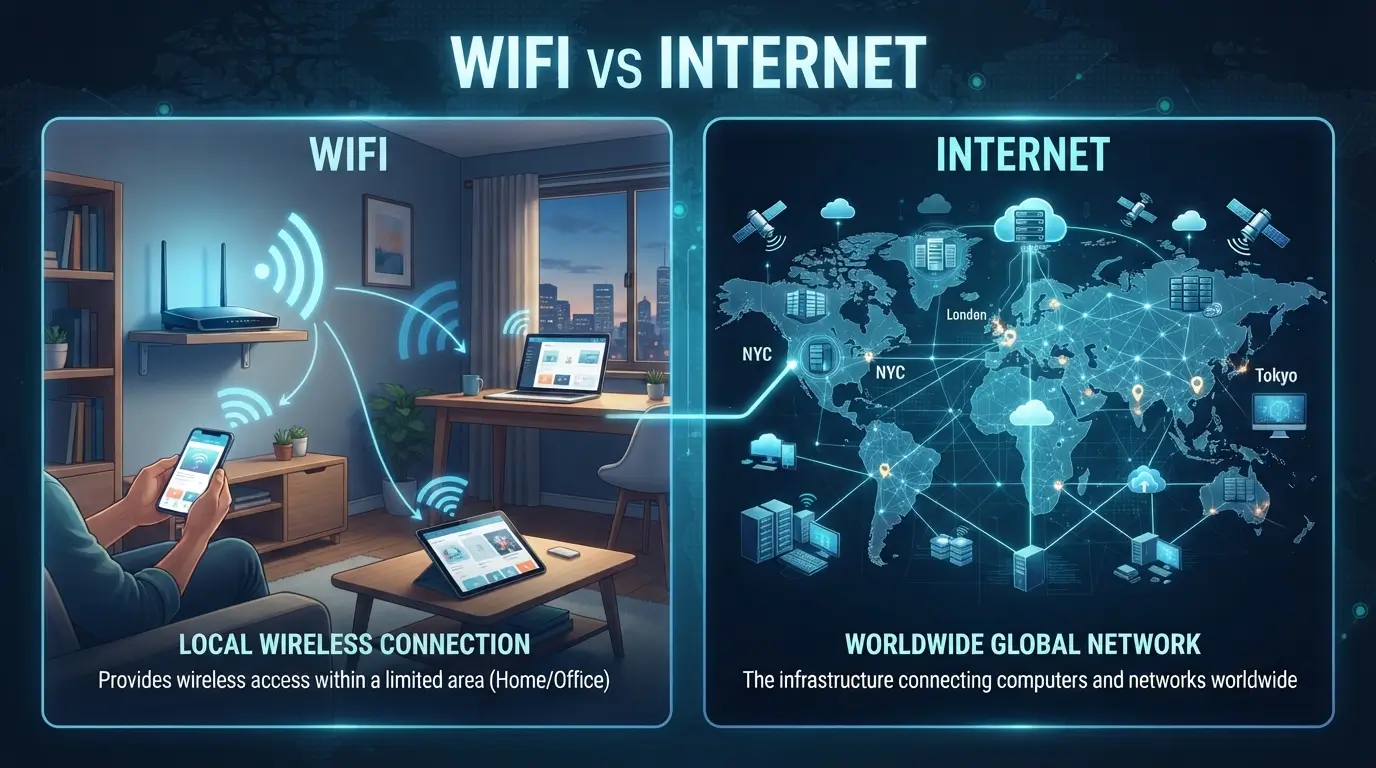
The difference between WiFi and internet is simple: WiFi connects your device to a local network, while the internet connects that network to computers and services around the world. You can have WiFi without internet, and you can use the internet without WiFi.
This guide explains the difference between WiFi and internet in plain English. It also covers their origins, spelling, common mistakes, everyday examples, and practical tips. By the end, you will know exactly what each term means and why the difference between WiFi and internet matters in daily life.
Quick Answer
WiFi is a wireless connection between your device and a local network. The internet is the worldwide network of networks that lets devices communicate and access online services.
Think of the connection as a short journey:
Your devicePhone, laptop, tablet, or smart TV
WiFi carries the connection to your router.
RouterConnects your home network to an internet service
Your internet service links the router to the wider world.
InternetWebsites, apps, servers, and online services
Simple example
- WiFi works, but the internet is down: Your phone may connect to the router, but websites will not load.
- The internet works, but WiFi is off: A computer connected through an Ethernet cable can still go online.
- Both work: Your phone connects to WiFi, and the router sends its requests through the internet.
In one sentence: WiFi is a way to connect to a network; the internet is the global network you may reach through it.
The Origin of WiFi and Internet
The words WiFi and internet come from different technical histories.
WiFi
WiFi is a brand name used for wireless networking technology. It is commonly written as Wi-Fi or WiFi. The name was created as a short, memorable term for products based on the IEEE 802.11 wireless networking standards.
The name is often explained as a play on “Hi-Fi,” but WiFi is not officially an abbreviation for “Wireless Fidelity.” That popular expansion is misleading. WiFi is a trademarked brand name used by the Wi-Fi Alliance.
WiFi technology allows devices to exchange data over radio waves. It is used in homes, offices, schools, airports, and many public places.
Internet
Internet comes from the idea of an “interconnected network.” The word is related to the technical term internetworking, which means linking separate networks together.
The modern internet developed from research networks and communication systems that connected computers across different locations. It is not one single machine. It is a vast system of connected networks that use shared communication rules, including the Internet Protocol.
Why the terms are confused
People often experience both services at the same time. When a phone connects to a home router, it may immediately open websites, stream videos, and send messages. This makes WiFi and the internet feel like one thing.
They are separate, however:
- WiFi is a local access method.
- The internet is a global communication network.
- A router often connects the two.
Pronunciation and parts of speech
| Term | Pronunciation | Part of speech | Meaning |
|---|---|---|---|
| WiFi | “WHY-fy” | Noun | Wireless networking technology or a wireless network |
| Internet | “IN-ter-net” | Noun | The worldwide network of connected computer networks |
Both terms are normally used as nouns.
- “The WiFi is slow.”
- “The internet is unavailable.”
In informal speech, people may say “I need WiFi” to mean “I need internet access.” The meaning is often clear from context, but the technical meanings remain different.
British English vs American English Spelling
There is no major British-versus-American spelling difference between WiFi and internet.
Both British and American English commonly use:
- WiFi
- Wi-Fi
- internet
The main variation is style, not regional spelling. Some organizations prefer the hyphenated form Wi-Fi, while others use WiFi. Both are widely recognized.
The word internet is also spelled the same in British and American English. The difference is sometimes seen in capitalization style: older writing often used Internet, while modern general writing commonly uses lowercase internet.
Comparison table
| Feature | British English | American English |
|---|---|---|
| WiFi spelling | WiFi or Wi-Fi | WiFi or Wi-Fi |
| Internet spelling | internet | internet |
| Common capitalization | internet | internet |
| Pronunciation | Similar | Similar |
| Main difference | Style preference | Style preference |
Example sentences
British English:
The WiFi in our office is strong, but the internet is slow.
American English:
The Wi-Fi at home works well, but the internet keeps dropping.
Both sentences are correct. The difference is mostly a matter of house style.
Which Spelling Should You Use?
Choose the form that fits your audience and the style of your website, school, or workplace.
For a US audience Use WiFi or Wi-Fi, depending on your chosen style. Use internet in most modern writing.
For a UK or Commonwealth audience The same spellings work. Keep your choice consistent across the article.
For a global audience Use WiFi and internet for simple, familiar wording. Explain the terms rather than relying on regional spelling.
For an educational article, WiFi and internet are both clear choices. If your brand uses Wi-Fi, follow that style throughout the site.
Common Mistakes with WiFi and Internet
1. Treating WiFi and internet as synonyms
Incorrect idea: “WiFi means the internet.”
Better: WiFi is the wireless link between your device and a local network. The internet is the global network beyond it.
2. Saying “the WiFi is down” when the internet is down
Your device may still be connected to the router even when the internet service has failed.
Better sentence:
My WiFi connection is active, but the internet service is not working.
3. Assuming every internet connection uses WiFi
Internet access can also come through:
- Ethernet cables
- Mobile data
- Fiber connections
- Satellite links
- Other wired or wireless technologies
Better sentence:
My laptop uses an Ethernet cable to access the internet.
4. Confusing a router with the internet
A router is a device. It directs traffic between networks. It is not the internet itself.
Better sentence:
The router connects my home network to the internet.
5. Using “WiFi” for every wireless signal
Not every wireless technology is WiFi. Bluetooth, mobile networks, and other radio systems work differently.
Better sentence:
My headphones use Bluetooth, while my laptop uses WiFi.
6. Writing “Wi-Fi internet” without meaning
The phrase is common in advertising, but it can be unclear. It may mean internet service delivered through a WiFi router.
Clearer alternatives:
- Home internet
- Wireless internet access
- Internet through WiFi
- WiFi connection
7. Assuming a strong WiFi signal guarantees fast internet
A strong signal only shows that your device has a good local connection. The internet service may still be slow because of congestion, outages, or other problems.
Better sentence:
My WiFi signal is strong, but the internet speed is poor.
Difference Between WiFi and Internet in Everyday Examples
The easiest way to understand the difference is to see how people use these words in real situations.
In emails
Example 1:
Hi Sara, the office WiFi is working, but we cannot access the internet. Could you check the router?
Here, the writer separates the local wireless connection from the outside network.
Example 2:
I will join the meeting once my internet connection is restored.
This sentence focuses on online access, not the specific connection method.
In news writing
Example:
A service outage left customers without internet access, although their devices remained connected to local WiFi networks.
This is more precise than saying all WiFi stopped working.
On social media
Example:
My WiFi is connected, but Instagram will not load.
This is common informal usage. The speaker may mean the internet connection is unavailable.
More precise version:
My phone is connected to WiFi, but the internet is not working.
In formal writing
Example:
The building provides WiFi access, but users must obtain internet service through an approved provider.
This sentence shows that local wireless access and internet service can be separate.
In technical support
Example:
First, check whether your device is connected to WiFi. Then test whether the router has access to the internet.
This order helps identify where the problem is.
In daily conversation
| Situation | Natural sentence |
|---|---|
| Asking for access | “What is the WiFi password?” |
| Reporting a service problem | “The internet is down.” |
| Describing a local connection | “My phone is connected to WiFi.” |
| Using a cable | “My computer is online through Ethernet.” |
| Explaining slow browsing | “The WiFi signal is strong, but the internet is slow.” |
How to tell which one is failing
When a connection stops working, ask these questions:
- Does your device show a WiFi connection?
- Can another device connect to the same router?
- Can any device open a website?
- Does a device connected by Ethernet have internet access?
- Is the router showing an internet or WAN warning?
These checks help separate a WiFi problem from an internet service problem.
Comparison Table: WiFi vs Internet
| Feature | WiFi | Internet |
|---|---|---|
| What it is | Wireless networking technology | Global network of connected networks |
| Main purpose | Connect devices to a local network | Connect networks and devices worldwide |
| Range | Usually limited to a local area | Worldwide |
| Connection type | Wireless radio signals | Wired and wireless technologies |
| Needs a router? | Usually uses a wireless access point or router | Often reaches users through a router or other network device |
| Can work without the other? | Yes, WiFi can work without internet access | Yes, internet access can work without WiFi |
| Example | Phone connected to home router | Phone loading a website |
| Common problem | Weak signal or router issue | Service outage or provider issue |
A useful way to remember
WiFi is the bridge from your device to the local network. The internet is the larger network beyond that bridge.
Frequently Asked Questions
1. Is WiFi the same as internet?
No. WiFi is a wireless way to connect your device to a local network. The internet is the global network that provides access to websites, apps, and online services.
2. Can WiFi work without internet?
Yes. Your phone or laptop can connect to a WiFi router even if the router has no internet service. You may still access local devices or shared files.
3. Can I use the internet without WiFi?
Yes. You can access the internet through Ethernet, mobile data, or other connection methods. WiFi is not required.
4. Why does my WiFi say connected but there is no internet?
Your device may have a good connection to the router, but the router may not be connected to the internet. The issue could involve your provider, modem, cable, or router settings.
5. Is WiFi faster than mobile data?
Not always. Speed depends on the network, signal quality, congestion, equipment, and service plan. A good WiFi connection may be faster, but mobile data can also be very fast.
6. Do I need WiFi to use a router?
A router can work without WiFi if you use Ethernet cables. However, a wireless router also provides WiFi for compatible devices.
7. Should I write WiFi or Wi-Fi?
Both forms are widely used. Choose one style and use it consistently. Wi-Fi is common in formal brand and technical writing, while WiFi is also widely accepted.
Conclusion
WiFi and the internet work together, but they are not the same. WiFi connects your device to a local network, while the internet links that network to the wider world.
Once you understand this difference, common problems become easier to explain. A device can stay connected to WiFi even when the internet is unavailable.
The same idea helps in school, work, and daily conversations. Clear words make technical topics less confusing and help others understand what you mean.
Keep practicing these terms in emails, essays, and everyday conversations. Small language choices build confidence, so use them often and enjoy learning.

Aamer Shahzad is the founder of Diffnexx.com, a fast-growing educational platform focused on high-intent “difference between” topics. With over 8 years of experience in English language education and analytical writing, I specialize in breaking down complex “difference between” topics into clear, structured, and easy-to-understand explanations. Diffnexx.com is your go-to resource for enhancing English skills and writing with confidence.
I specializes in building search-optimized, research-driven comparison content designed for clarity, authority, and long-term digital asset value.